How to Launch Your First Online Fundraiser
 Posted by Ally Patterson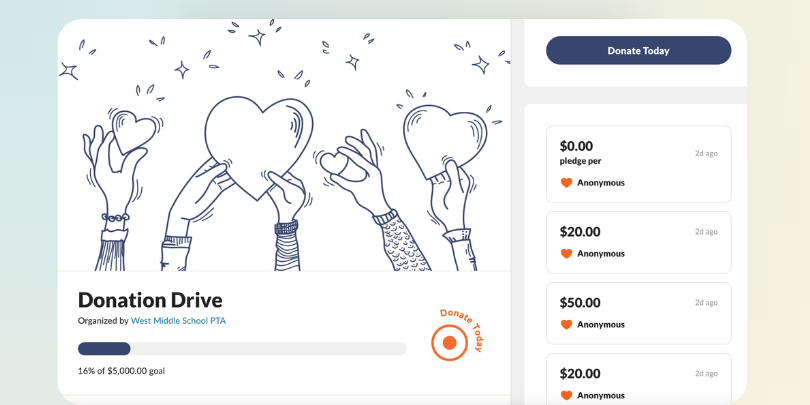
Quick Start — Jump to your section
Set Your Goal Build Your Fundraiser Page Set Up Donation Collection Share Your Fundraiser Track Progress and Follow Up Frequently Asked QuestionsPosted by Ally PattersonQuick Start — Jump to your section
Set Your Goal Build Your Fundraiser Page Set Up Donation Collection Share Your Fundraiser Track Progress and Follow Up Frequently Asked QuestionsEvery successful fundraiser starts with clarity. Before you build anything, decide two things: what you're raising money for and how much you need.
Your goal doesn't have to be exact. It just needs to be specific enough that donors understand where their money goes. "New playground equipment for Lincoln Elementary" is stronger than "school improvements." A concrete goal builds trust and motivates people to give.
Once you have your purpose, set a dollar target. Think about your community size, your average donor, and what feels achievable in your timeline. You can always raise more than your goal. But having one gives donors a sense of participation and progress, and a live progress bar on your page makes that momentum visible to everyone who visits.

Genius Tip
Break your goal into giving tiers. "25 donors at $20 gets us halfway there" helps people feel like their contribution matters and makes a big number feel reachable.
With your goal in hand, it's time to build. Here's what to include on your Fundraiser page:
A photo (optional but effective). A real image of the people, place, or project your fundraiser supports builds trust and connection.
You don't need to be a designer. The setup takes minutes, and everything lives on one link your community can return to.
👉 Ready to get going?
Check out our video on how to build your fundraiser page and start collecting donations today.
How to Build a Fundraiser PageOnce your page is built, connect your payments. SignUpGenius processes donations securely through Stripe, which means your donors' payment information is protected and your funds go directly to you.
To start collecting, you'll connect or create a Stripe account during setup. If you don't have one, SignUpGenius walks you through it. It only takes a few minutes.
A few things to configure before you launch:
| Setup Step | What to Do | Why It Matters |
|---|---|---|
| Connect Payments | Link your Stripe account | Donations deposit directly to you |
| Set Suggested Amounts | Add 3–4 giving tiers | Reduces decision friction and lifts average gift size |
| Enable Custom Amount | Turn on open-entry giving | Captures larger and smaller gifts |
| Offer Recurring Giving | Enable monthly, quarterly, or annual options | Turns one-time donors into ongoing supporters |
| Donor Fee Coverage | Offer the option to cover processing fees | More of each gift reaches your cause |
| Thank-You Message | Write a short confirmation note | Builds trust and encourages repeat giving |
👉A note for verified nonprofits: If your organization is a registered 501(c)(3), you can get a verified badge displayed on your fundraiser page. Donors also receive automated tax-deductible receipts, so you don't have to manage that paperwork manually.
Your page is ready. Now get it in front of people.
The simplest approach: copy your link and share it everywhere your community already gathers. That might be a class email list, a group text, a neighborhood Facebook group, a church bulletin, or a team chat.
A few sharing tips that improve participation:
Genius Tip
Your first wave of donors matters most. Ask three to five people you know well to give before your public launch. Early momentum makes your fundraiser look active and encourages others to join in.
Once donations start coming in, your SignUpGenius dashboard shows you who gave, how much, and when. No chasing down receipts. No building a spreadsheet from scratch. The tracking happens automatically so you can focus on the people, not the paperwork.
Use this visibility to stay organized and keep your community engaged:
Do I need a Stripe account to collect donations? Yes. SignUpGenius processes donations through Stripe to keep your donors' payment information secure and send funds directly to you. If you don't have a Stripe account, you can create one for free during setup. The process takes just a few minutes.
Is there a fee to use SignUpGenius for fundraising? Stripe charges a standard processing fee per transaction. You can choose to pass this fee on to donors or absorb it yourself. Fees are shown transparently at checkout so donors always know exactly what they're paying. Visit our pricing page for current plan details.
Can donors give any amount, or are they limited to preset options? Both. You can set suggested amounts to make giving easier and also allow donors to enter a custom amount. Most organizers use both options together, and suggested amounts often lead to higher average gifts.
Can donors give on a recurring basis? Yes. You can enable recurring giving options, including monthly, quarterly, and annual schedules. Donors commit once and are charged automatically on the schedule you set. This is particularly useful for nonprofits or community groups running ongoing campaigns.
How do donors know their payment went through? Donors receive an automatic confirmation after giving. You can personalize the thank-you message they see. Verified nonprofits automatically send tax-deductible receipts as well.
Can I run a fundraiser alongside a volunteer sign up? Yes. SignUpGenius lets you combine donation collection with time slot or task sign ups on the same page. This is useful for events where you need both participation and financial support.
How long can my fundraiser stay active? You control the timeline. You can set an end date or leave the page open until you manually close it.
Can I see who donated and how much? Yes. Your dashboard shows each donation in real time, including the donor's name, amount, and the date and time of the gift.
What happens to donations after my fundraiser ends? Donations are deposited to your connected Stripe account on Stripe's standard payout schedule. Instant transfers are also available for a small fee if you need funds sooner.
What if I want supporters to fundraise on my behalf? SignUpGenius also offers Peer-to-Peer Fundraisers, where participants get their own personal fundraising pages to share with their networks. Instead of one person doing all the work, your whole team, class, or club can participate. It's included on all plans, even free.
How to Plan a Back-to-School Fundraiser
Pick a format that fits a six-week fall window and your volunteer team. Includes a week-by-week launch timeline and tips to keep families giving.
Plan your fall fundraiserHow to Write a Fundraiser Page That Gets Donations
Set a goal that motivates giving, choose suggested amounts, and write a description people read. Then share your page so it fills faster.
Write a fundraiser page that worksOur church hosts a huge one-day food packaging event requiring over 700 volunteers. All of them sign up through SignUpGenius, which allows for a streamlined, nearly flawless check-in experience at event time. I run a report at the last minute to show who signed up on what shift at which table and how many people are coming with them. I also run a separate report that shows me where any empty spots are need to be filled in. I don't know how this event could be run without SignUpGenius.
Mary Margaret Koch