How to Make Your Sign Up Stand Out
Simple ways to customize your sign ups so they are easier to use, more engaging, and more effective.
 Posted by Ally Patterson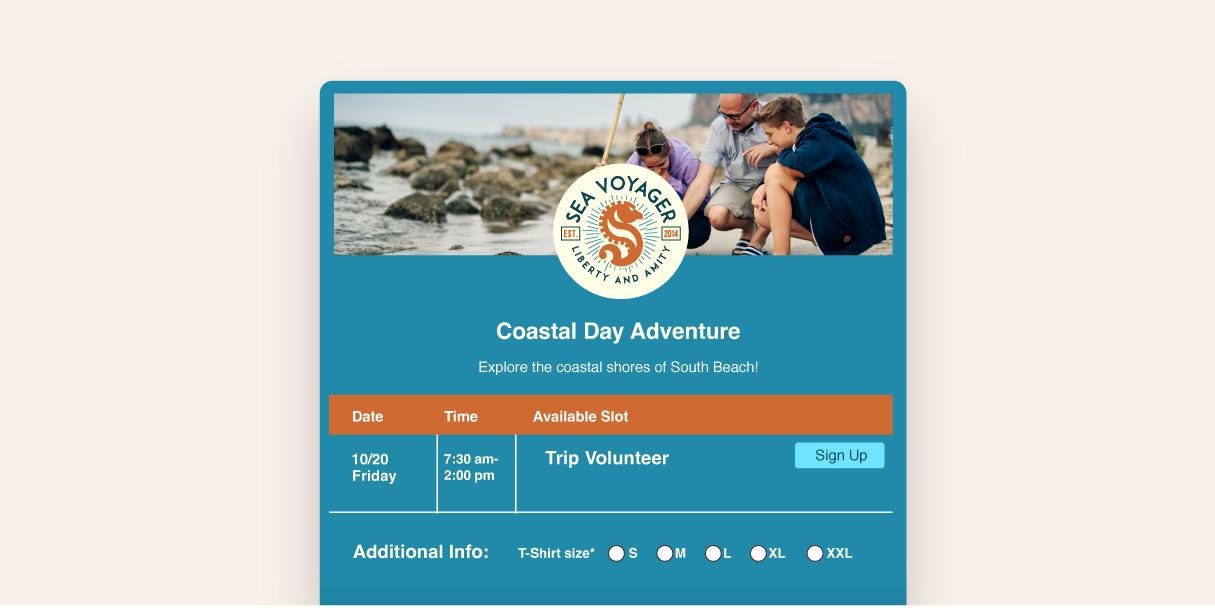
Sign ups play a big role in attracting participants and volunteers, whether you are planning events for a school, church, nonprofit, team, or business. A clear and polished sign up helps people understand what is expected and encourages them to commit with confidence.
SignUpGenius offers built-in features that let you customize both the look and functionality of your sign ups. From visual design to communication tools, these options help you create sign ups that feel organized, professional, and easy to use.
Below are practical ways to personalize your sign ups so they stand out and perform better for both you and your participants. Each section includes common use cases to help you apply these ideas right away.
👉 Basic sign ups are always free! But the availability of ceratin features is dependent upon your plan type. Check out our Pricing Page to compare prices and features to find the plan the best suits your needs.
Use Premium Themes and Custom Designs
The look of your sign up sets the tone before anyone chooses a slot. Premium themes help your sign up feel intentional and relevant to your event.
Paid plans offer hundreds of premium themes designed for seasons, holidays, schools, faith-based events, sports teams, and more. These designs instantly elevate the appearance of your sign up without extra work.
If you need a more tailored look, custom themes allow you to match your organization’s colors, images, and branding. This is especially helpful for larger events or recurring sign ups where consistency matters.
🧠 Genius Tip: Choose a theme that reflects the purpose of your event. A clear visual connection helps participants understand the context right away and increases completion rates.
Common use cases: back-to-school sign ups, church holiday services, volunteer events, sports team schedules.
Remove Ads for a Cleaner Experience
Ads help support the Free version of SignUpGenius, but for some events they can be distracting. Removing ads keeps the focus on your sign up and your message.
With paid plans, you can remove ads from eligible sign ups directly in the settings section of the sign up builder. Your plan level determines how many sign ups can be ad-free at one time.
Common use cases: nonprofit fundraisers, church events, PTA events, business-sponsored sign ups.
Why it matters: A clutter-free page feels more professional and helps participants focus on choosing a slot.
Send Custom Notifications to Participants
Clear communication is one of the most important parts of a successful sign up. Custom notifications let you share important details automatically after someone signs up.
You can use this feature to include reminders about what to bring, where to go, or any next steps participants need to complete. These messages are sent automatically when someone signs up, ensuring everyone receives the same information.
🧠 Genius Tip: Use custom notifications to answer common questions up front so participants do not need to follow up later.
Common use cases: volunteer shifts, field trips, meal trains, sports practices.
Customize Your Sign Up Link
A clean, recognizable link makes your sign up easier to share and easier to trust.
Certain paid plan users customize their sign up URL to better reflect their organization or event. Short, branded links work well in emails, newsletters, bulletins, and printed materials.
If you want an even more seamless experience, Enterprise/Custom plans also support embeddable sign ups.
Common use cases: church bulletins, school newsletters, nonprofit websites, internal company pages. This allows your sign up to live directly on your website while maintaining full functionality.
Remove SignUpGenius Branding
For organizations that want a fully branded experience, removing SignUpGenius branding creates a sign up that looks and feels like your own.
Certain plans allow SignUpGenius logos and banners to be removed from your sign up pages. Combined with custom themes and images, this creates a cohesive and professional experience for participants.
Why it matters: A fully branded sign up builds trust and reinforces your organization’s identity.
Common use cases: corporate volunteer programs, large churches, district-wide school initiatives.
Small Customizations That Make a Big Difference
These optimizations improve participations, usability, and completion rates across all types of sign ups:
Even small adjustments can improve participation and reduce confusion:
- Add clear slot titles and descriptions so expectations are obvious
- Set participant limits to avoid overbooking
- Use reminders to reduce no-shows
- Reuse sign ups for recurring events to save time
A thoughtful sign up does more than collect names. It sets expectations, improves communication, and helps people feel confident saying yes. With the right combination of design, messaging, and customization, your sign ups can look polished while working harder behind the scenes.
Recent Blog Articles



SignUpGenius has been incredible. Nothing but praise from all of our parents. We have 236 swimmers and nine meets in a six-week period. We managed 706 volunteer slots without an issue with this site.
Rich Young